If you only need to know how to download Pinterest video, the three steps below take about twenty seconds. If you want to know why the file came back softer than it looked on Pinterest, stay for the second half — because that part is not your downloader’s fault, and almost every “best Pinterest downloader” list on page one gets it wrong.
How to download Pinterest video in three steps
To download a Pinterest video, copy the pin’s link, paste it into a Pinterest downloader, and save the MP4. There is no account to make and nothing to install.
On iPhone and Android
- Copy the pin’s link. Open the video pin, tap the share arrow, then tap Copy link.
- Paste it into the tool. Open the Pinterest video downloader and drop the link in the box.
- Save the file. Press Download. On iPhone the MP4 lands in Files or Photos; on Android it goes to your Downloads folder.
On desktop
The share button sits just under the pin on the web. Copy that link, paste, download. Same three steps, same file — the device you use changes nothing about what Pinterest hands over, which turns out to be the whole story here.
Try the Pinterest downloaderPaste a pin link, get the original file. No watermark, no account. Open the toolThe 720×1280 ceiling every “HD” claim runs into
Here is the finding that should decide which tool you use: Pinterest will not give you a 1080p file. Not to us, not to any downloader, not to a paid desktop app. The highest resolution Pinterest serves for a video pin is 720×1280, and no software can raise a ceiling set on someone else’s server.
What we measured
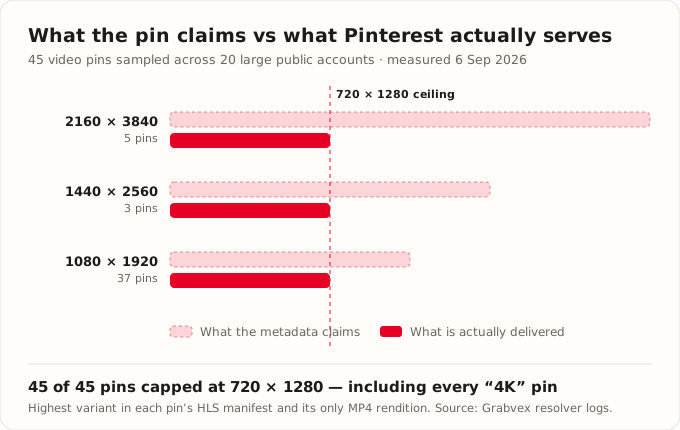
We pulled 878 live pins from 20 large public Pinterest accounts — Delish, Tasty, Nike, Sephora, Target, IKEA USA, HGTV, NYT Cooking, Food52 and others — through Pinterest’s public pin-widget endpoint on 6 September 2026. Of those, 90 carried a downloadable video. We then read the HLS manifest behind 45 of them to see every rendition Pinterest offers.
Every video pin ships exactly two things: an adaptive HLS stream (V_HLSV4, an .m3u8 playlist) and a single MP4 (V_720P). We checked both. The MP4 measured 720×1280 when we parsed its actual container header, and the top rung of every HLS ladder was also 720×1280 — the variants below it step down through 540×960, 360×640 and 234×416.
Why the numbers in the metadata are not the file you get
This is the trap. Each pin reports a width and height in its metadata — usually 1080×1920, sometimes 1440×2560, occasionally 2160×3840. Those numbers describe the file the creator uploaded, not the rendition Pinterest transcodes and serves. Read the metadata and you would swear 4K pins exist. Fetch the actual bytes and every one of them is 720×1280.
A downloader that reads that metadata and prints it as a quality menu is not necessarily lying on purpose. It is repeating a number Pinterest never intends to honour.
If a Pinterest downloader offers you 4K, one of two things is happening: it is upscaling 720×1280 and guessing the extra pixels, or it is labelling a button after a number it read in a JSON field. Either way the file you receive is the same 720×1280 MP4 everyone else gets.
Pinterest video downloader comparison: what six tools can actually do
Once you know the ceiling, a comparison table stops being about quality and starts being about honesty and coverage. The third column below is identical for every row, and that is the point.
| Tool | Advertised quality | Actually delivers | Finds Idea Pins | Ads or install |
|---|---|---|---|---|
| Grabvex | “Best available” | 720×1280 | Yes | Neither |
| cobalt.tools | Not stated | 720×1280 | Single video pins only | Neither |
| “HD” web downloaders | HD / 1080p | 720×1280 | Varies | Interstitial ads common |
| Quality-menu sites | 1080p / 720p / 480p | 720×1280 | Varies | Interstitial ads common |
| Browser extensions | HD | 720×1280 | Varies | Install required |
| Android apps | HD / 4K | 720×1280 | Varies | Install + in-app ads |
Nothing in that table can beat 720×1280, because nothing is allowed to. So the tools advertising 1080p and 4K are not offering you more — they are describing the same file in louder language, and charging you an ad interstitial or an APK for the privilege.
Why your downloader says “no video found”
This is the failure people actually hit when they look up how to download Pinterest video, and it has nothing to do with resolution.
Two-thirds of video pins report that they are not videos
Pinterest exposes an is_video flag. It is unreliable. Of the 90 pins in our sample that carried a genuine downloadable MP4, 59 reported is_video as false — roughly two out of every three. A downloader that trusts that flag looks at a video pin, decides there is no video, and hands you the cover image instead. If a tool has ever told you a working pin was “just an image”, this is why.
Idea Pins keep the video one level deeper
132 of the 878 pins we sampled were Idea Pins, the multi-page format Pinterest merged into the standard pin format in 2023. Their clips do not sit in the usual video field. They are nested inside story_pin_data, one per page. Nine of our 90 videos existed only there — invisible to any tool that checks a single field and gives up. Pinterest’s own guide to pin types explains the formats but never says where the media lives.
The same gap explains bad image saves. The widget response hands back a 564×846 preview by default; the original sits at a different path entirely. On the pin we spot-checked, the preview was 154 KB and the original 336 KB — more than double the data. A tool that skips that upgrade gives you a thumbnail and calls it a download. Our Pinterest downloader resolves image pins to the original, and returns GIF pins as a real animated file rather than a frozen frame.
The pin is private, deleted, or not a video
If the flag is not the problem, one of these usually is:
- It sits on a secret board or a private profile. Private media is not public, so no downloader can reach it. Open the link in a private browser window: if you cannot see the pin there, neither can a tool.
- The pin was deleted. Once the original is gone from Pinterest, there is no file left to fetch.
- You copied the wrong link. Copy the link to the pin itself, not your search results or one of your boards.
- It is an image, not a video. Some pins only look like video thumbnails. Paste one anyway and Grabvex saves the original image instead.
Why a Pinterest video has no watermark
People expect a logo because TikTok stamps one on. Pinterest does not. The MP4 it serves is a clean 720×1280 copy of the creator’s upload with nothing burned in, so there is no watermark to remove because none was ever added.
That also means no tool can honestly promise to “remove the Pinterest watermark.” A site that advertises it is selling a feature that does not exist — the same kind of promise as the 4K button above.
So which Pinterest tool is better?
Every guide on how to download Pinterest video ends with a recommendation, so here is ours. Since every tool hits the same 720×1280 wall, quality cannot be the tiebreaker — which means the marketing most of these sites lead with is worthless. Three things actually separate them:
- Does it find the video at all? With two-thirds of video pins mislabelled and Idea Pins hiding their clips a level deeper, this is where tools genuinely differ.
- What does it cost you to get there? An interstitial ad, a redirect chain, or an APK is a real price even when the download is free.
- Is it honest about the ceiling? A tool that offers 4K on a platform that serves 720×1280 is telling you something about how it treats you.
Grabvex labels the file “Best” rather than inventing a number, walks story_pin_data so Idea Pins resolve, upgrades images to the original, and shows no ads. That is the honest version of the same 720×1280 file everyone else is selling — and it is the whole reason the tool exists. And if you have met tools claiming to strip watermarks, here is how to tell if a no watermark downloader is real.
What a Pinterest downloader with no ads looks like
Most free Pinterest tools pay for themselves with redirect pages, countdown timers and pop-ups that open a second tab before handing anything over. None of it is technical: a pin’s file is ready the moment the link resolves, so a timer exists only to show you ads. A Pinterest downloader with no ads is one paste, one button and the file.
That is why Reddit’s privacy communities keep pointing people to cobalt.tools, and for a single video pin it is a solid pick. It is not built around Pinterest, though: it has no image or GIF handling, and that is where most pins live. Grabvex resolves video, image and GIF pins from the same box.
A word on using what you save
Downloading a pin is easy; using it respectfully is the part that matters. Save your own pins freely. For someone else’s work, keep it for personal use or ask before you repost it, and credit the creator.
Frequently asked questions
Can you download Pinterest videos in 1080p or 4K?
Why does my Pinterest downloader say “no video found”?
Is it safe to use a Pinterest video downloader?
Do Pinterest videos have a watermark?
Can you download Pinterest Idea Pins?
How we tested
On 6 September 2026 we sampled 878 pins from 20 large public Pinterest accounts using Pinterest’s public pin-widget endpoint, the same interface that powers embeddable pins. For each pin we recorded the is_video flag, the contents of videos.video_list and story_pin_data, and every rendition offered. For 45 video pins we fetched the HLS master playlist and read each RESOLUTION entry; for eight we downloaded the MP4 header and parsed the track box to confirm the encoded dimensions rather than trusting any label. Every figure in this article comes from that run, and it describes public pins only. Re-run it yourself and you should find the same ceiling.